
Get Wizard Trader Algo Strategy Access
Get WT7 Algo Strategy Access on TRADO Connect Platform
AuthorWizard Trader
Published July 19, 2026
Updated July 20, 2026
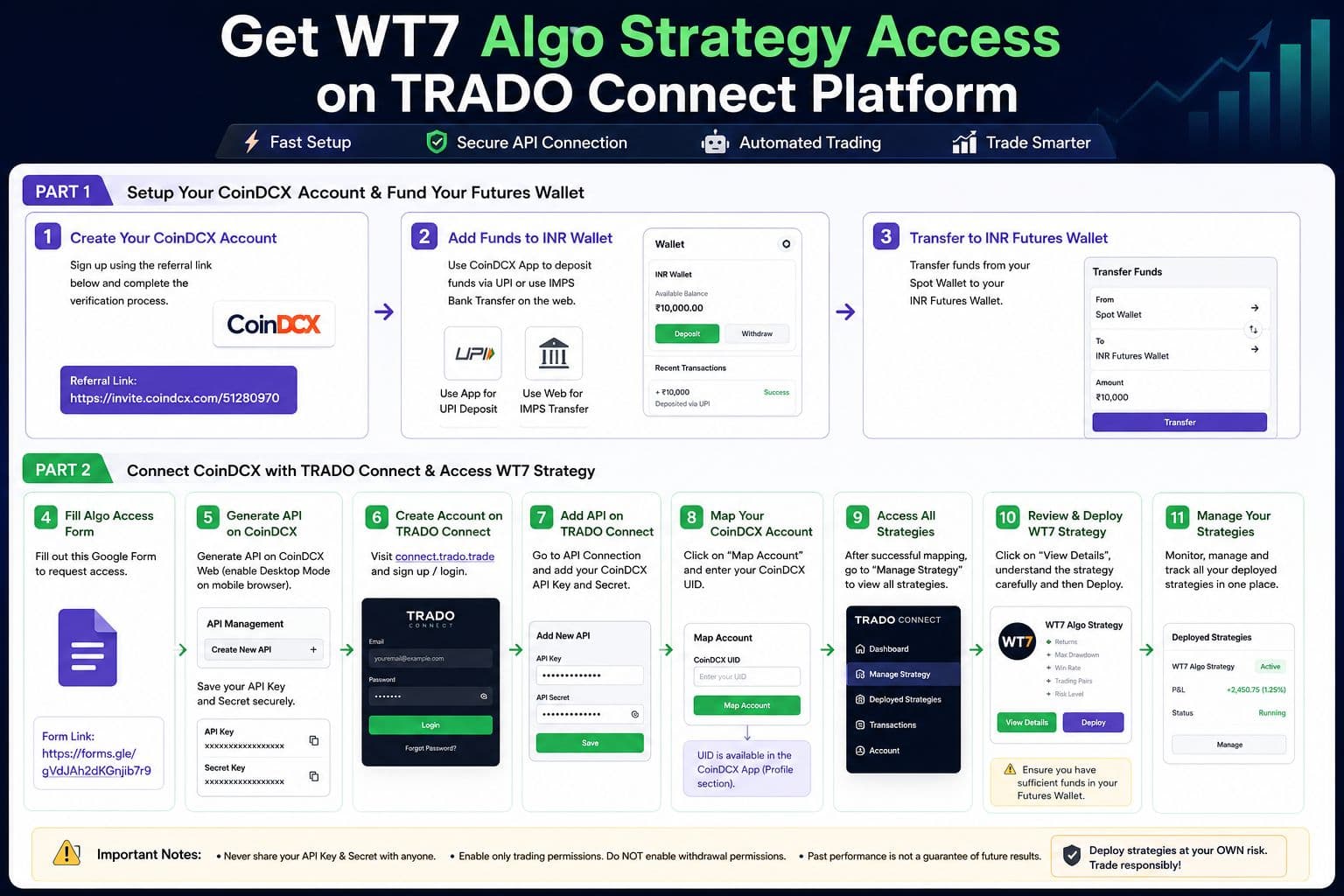
How to Get Algo Strategy Access on TRADO Connect
Follow the steps below carefully to create your CoinDCX account, add funds, connect your CoinDCX account with TRADO Connect, and deploy an Algo Strategy.
Step 1: Create Your CoinDCX Account
CoinDCX Referral Link: https://invite.coindcx.com/51280970
Complete the required KYC process on CoinDCX.
Step 2: Add Funds to Your CoinDCX INR Wallet
After successfully creating and verifying your CoinDCX account, add funds to your INR Wallet.
You can deposit funds through:
UPI:
Use the CoinDCX mobile application to deposit funds via UPI.
IMPS Bank Transfer:
On the CoinDCX website, you can use the available bank transfer option to deposit funds.
Step 3: Transfer Funds to Your Futures Wallet
After your funds are credited to your INR Wallet:
Open your CoinDCX account.
Go to the Wallet section.
Transfer the required amount from your Spot Wallet to your INR Futures Wallet.
⚠️ Important: Before deploying any Algo Strategy, make sure you have sufficient funds available in your Futures Wallet.
How to Get Access to Algo Strategies
Step 4: Fill Out the Algo Access Form
Algo Access Form: https://forms.gle/gVdJAh2dKGnjib7r9
Step 5: Generate API Credentials on CoinDCX
To connect your CoinDCX account with TRADO Connect, you need to generate API credentials.
Important:
API generation is currently available only on the CoinDCX Web platform.
If you are using a mobile phone:
Open a browser on your phone.
Visit the CoinDCX website.
Enable Desktop Site / Desktop Mode in your browser.
Log in to your CoinDCX account.
Go to the Profile Section and select API Dashboard.
Generate a new API Key and Secret.
⚠️ Security Warning:
Never share your API Key or API Secret with anyone.
Do not share them in screenshots, WhatsApp groups, Telegram groups, or public documents.
While creating the API, save the credentials securely because the Secret may not be shown again.
Step 6: Create Your TRADO Connect Account
Visit:
TRADO Connect: https://connect.trado.trade
Step 7: Add Your CoinDCX API Credentials
After logging in to TRADO Connect:
Go to the Manage API and select CoinDCX
Enter your CoinDCX API Key and Secret Key
Save the details.
Your CoinDCX account will now be connected to TRADO Connect.
Step 8: Map Your CoinDCX Account
After adding your API credentials:
Click on “Map Account” in the top right corner.
Enter your CoinDCX UID.
Submit the details.
Where can you find your CoinDCX UID?
Your CoinDCX UID is available in the CoinDCX mobile application.
Make sure you enter the correct UID to avoid delays in account activation.
Step 9: Access the Algo Strategies
Once your CoinDCX account is successfully mapped:
Go to the Manage Strategy section.
You will be able to view the available Algo Strategies.
Click on “View Details” for any strategy you are interested in.
Before Deploying Any Strategy
⚠️ Please read the complete strategy details carefully before deployment.
Review important information such as:
Strategy performance
Historical returns
Drawdown
Trading frequency
Risk level
Capital requirement
Leverage used
Trading pairs
Strategy behaviour during market volatility
Do not deploy a strategy only by looking at its past returns.
Choose a strategy based on your own:
Risk appetite
Available capital
Trading objectives
Understanding of the strategy
Step 10: Deploy the Strategy
Once you have carefully reviewed the strategy details:
Select the strategy you want to use.
Click on Deploy.
Choose your multiplier as per your capital.
Confirm the deployment.
⚠️ Make sure you have sufficient funds in your CoinDCX Futures Wallet before deploying a strategy.
Step 11: Manage Your Deployed Strategies
After deployment, you can manage your strategies from the Manage Strategy section.
From there, you can monitor and manage your active strategies and review their performance.
Important Risk Disclaimer
Algo trading involves market risk. Past performance does not guarantee future results.
Every user should carefully understand the strategy before deployment and deploy only with capital they can afford to lose.
Deploy strategies at your own risk.
Sign up for updates
TRADO is a Software as a Service (SaaS) Company & your gateway to seamless and empowered trading experience. We specialize in crafting innovative solutions to enhance the journey of traders. Built by Skilled IITians & Experienced Traders, combines cutting-edge technology with user-friendly interfaces, ensuring that you trade with efficiency, accuracy, and confidence.
© 2026 Windigotrade Pvt Ltd. All rights reserved.
Charts are powered by TradingView